Microsoft recently announced an upcoming update will allow the OneDrive Sync client for Windows to automatically recognize personal Microsoft accounts on business-managed devices. When detected, users are prompted to sync their personal OneDrive files. If accepted, both personal and business files will sync side by side—potentially without oversight or restrictions.
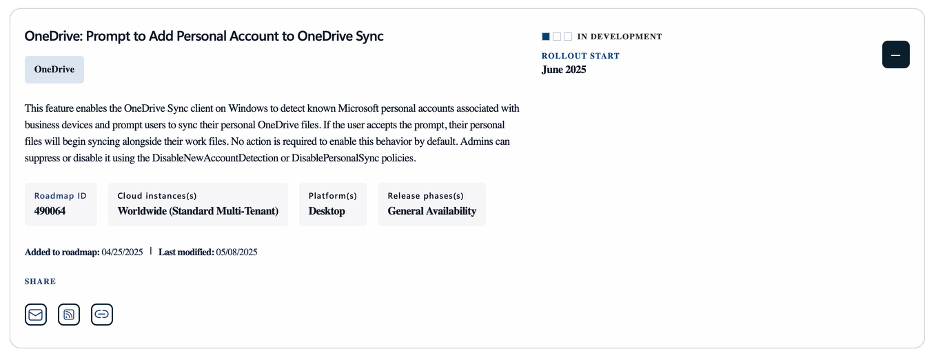
This functionality is enabled by default and requires no user or administrator action to activate. While this may enhance user convenience, it also introduces potential security and compliance risks. Organizations looking to stay in control of their data should consider proactive configuration and protection.
Our services help ensure that personal syncing is managed in line with your security policies—before it becomes a risk.
1. Configure Device Management Policies
The first approach uses your device management tools (e.g., Intune) or Active Directory group policies to configure the DisablePersonalSync setting. This prevents users from adding personal OneDrive accounts to the sync client.
While this addresses Microsoft's recently introduced feature that automatically prompts users to sync personal accounts, it does not prevent users from manually uploading sensitive files to personal cloud services like OneDrive (web), Google Drive, Dropbox, or others via the browser.
2. Deploy a CASB Solution (e.g., Netskope)
A more comprehensive approach involves using a Cloud Access Security Broker (CASB) like NetSkope. CASBs go beyond sync control—they monitor and manage cloud traffic in real time, ensuring users cannot upload data to any unauthorized cloud storage provider.
CASBs also protect against emerging data leakage vectors. For example, they can block users from sharing confidential business data with unapproved generative AI tools or external SaaS platforms—a growing risk in today’s digital workplace.
Thanks to our strategic partnerships with both Microsoft and Netskope, we are uniquely positioned to deliver a comprehensive, end-to-end solution—ranging from policy-based controls to full cloud security coverage.
Let’s talk about how we can help secure your environment via eb.cesnys@olleh or +32 494 03 28 66